Managing your academic performance at the University of Central Punjab (UCP) requires precise tracking of your Grade Point Average (GPA) and Cumulative Grade Point Average (CGPA).
These critical metrics determine your academic standing, scholarship eligibility, and future opportunities.
With UCP’s specific grading system and credit hour requirements, accurate calculations become essential for every student’s success.
Understanding UCP’s Grading System
The University of Central Punjab employs a comprehensive grading system that converts letter grades into numerical grade points.
This standardized approach ensures fair evaluation across all departments and programs.
UCP Grading Scale Breakdown
| Letter Grade | Percentage Range | Grade Points | Description |
| A+ | 90-100 | 4.00 | Outstanding |
| A | 85-89 | 4.00 | Excellent |
| A- | 80-84 | 3.70 | Very Good |
| B+ | 75-79 | 3.30 | Good |
| B | 70-74 | 3.00 | Above Average |
| B- | 67-69 | 2.70 | Average |
| C+ | 64-66 | 2.30 | Below Average |
| C | 60-63 | 2.00 | Poor |
| C- | 57-59 | 1.70 | Very Poor |
| D+ | 54-56 | 1.30 | Unsatisfactory |
| D | 50-53 | 1.00 | Minimum Pass |
| F | Below 50 | 0.00 | Fail |
How to Calculate GPA: Step-by-Step Guide
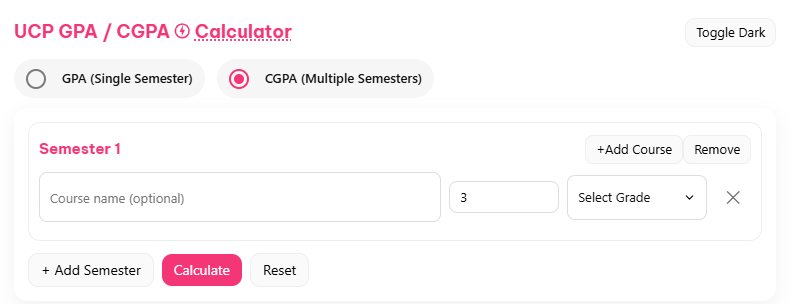
Calculating your GPA manually involves multiplying each course’s grade points by its credit hours, then dividing the total grade points by total credit hours attempted.
GPA Calculation Formula
GPA = (Sum of Grade Points × Credit Hours) ÷ Total Credit Hours
Practical GPA Calculation Example
Let’s calculate GPA for a student taking three courses:
- Course 1: Database Systems – Grade: A+ (4.0 points), Credit Hours: 4
- Course 2: Software Engineering – Grade: B+ (3.3 points), Credit Hours: 3
- Course 3: Web Development – Grade: C (2.0 points), Credit Hours: 2
Calculation:
- Course 1: 4.0 × 4 = 16.0 grade points
- Course 2: 3.3 × 3 = 9.9 grade points
- Course 3: 2.0 × 2 = 4.0 grade points
Total Grade Points: 16.0 + 9.9 + 4.0 = 29.9
Total Credit Hours: 4 + 3 + 2 = 9
GPA: 29.9 ÷ 9 = 3.32
This calculation shows how different grades and credit hours impact your overall GPA, emphasizing the importance of performing well in higher-credit courses.
How to Calculate CGPA: Comprehensive Guide
CGPA represents your overall academic performance across multiple semesters. Unlike GPA, which focuses on a single semester, CGPA provides a cumulative view of your entire academic journey at UCP.
CGPA Calculation Formula
CGPA = (Sum of All Grade Points from All Semesters) ÷ Total Credit Hours from All Semesters
Simple CGPA Calculation Example
Consider a student completing two semesters:
- Semester 1: GPA 3.5, Credit Hours: 15
- Semester 2: GPA 3.7, Credit Hours: 15
Calculation:
- Semester 1 Grade Points: 3.5 × 15 = 52.5
- Semester 2 Grade Points: 3.7 × 15 = 55.5
- Total Grade Points: 52.5 + 55.5 = 108.0
- Total Credit Hours: 15 + 15 = 30
- CGPA: 108.0 ÷ 30 = 3.6
Complex CGPA Calculation Example
For a student completing four semesters with varying credit loads:
- Semester 1: GPA 3.2, Credit Hours: 16
- Semester 2: GPA 3.5, Credit Hours: 16
- Semester 3: GPA 3.8, Credit Hours: 15
- Semester 4: GPA 3.9, Credit Hours: 15
Detailed Calculation:
- Semester 1: 3.2 × 16 = 51.2 grade points
- Semester 2: 3.5 × 16 = 56.0 grade points
- Semester 3: 3.8 × 15 = 57.0 grade points
- Semester 4: 3.9 × 15 = 58.5 grade points
Total Grade Points: 51.2 + 56.0 + 57.0 + 58.5 = 222.7
Total Credit Hours: 16 + 16 + 15 + 15 = 62
CGPA: 222.7 ÷ 62 = 3.59
This example demonstrates how consistent improvement across semesters positively impacts your overall CGPA.
How to Use Our UCP GPA/CGPA Calculator
Using our calculator requires just a few simple steps, making it accessible for students at any academic level.
Step-by-Step Instructions
- Access the Calculator
- Visit our online calculator page
- No registration or downloads required
- Enter Course Information
- Input course name (optional but recommended)
- Select credit hours from dropdown menu (1-6 hours)
- Choose letter grade from UCP grading scale
- Add Multiple Courses
- Click “Add Course” for additional entries
- Repeat process for all semester courses
- Use “Clear” button to remove individual courses
- Calculate Results
- Click “Calculate GPA” for instant results
- View detailed breakdown of calculations
- Use “Reset” to start new calculations
Tips for Maximizing Academic Success at UCP
Beyond using our calculator, implementing strategic academic practices significantly improves your GPA and CGPA performance.
Proven Academic Strategies
Course Selection Optimization
- Balance challenging courses with manageable workloads
- Consider prerequisite sequences for efficient progression
- Select courses aligned with your strengths and career goals
Time Management Excellence
- Create detailed study schedules for each semester
- Allocate extra time for high-credit hour courses
- Use digital calendars for assignment and exam tracking
Study Technique Enhancement
- Form study groups with high-performing classmates
- Utilize UCP’s tutoring and academic support services
- Practice active learning techniques like summarization and teaching
Professor Relationship Building
- Attend office hours regularly for clarification
- Participate actively in classroom discussions
- Seek feedback on assignments and exams
UCP Resource Utilization
Academic Support Services
- Writing Center for essay and report assistance
- Math and Science tutoring programs
- Library research support and study spaces
Technology Integration
- UCP’s learning management system for course materials
- Online databases for research projects
- Digital tools for collaborative assignments
Career Planning Connection
- Link academic performance to career objectives
- Participate in internship programs for practical experience
- Attend career fairs and networking events
Transform Your Academic Journey
Improve Your Grades Today with our Calculator and join thousands of successful UCP students who have transformed their academic performance through strategic planning and consistent monitoring.