UTM CGPA Calculator
GPA is one semester only; CGPA is all semesters combined.
UTM 4.0 scale: A+/A=4.00, A-=3.67, B+=3.33, B=3.00, B-=2.67, C+=2.33, C=2.00, C-=1.67, D+=1.33, D=1.00, D-=0.67, E=0.00.
Each course contributes gradePoint × creditHours to totals.
CGPA → % (approx): (CGPA/4)×100. Also shows 5.0 & 10.0 scale equivalents.
Prior Cumulative (All Previous Semesters)
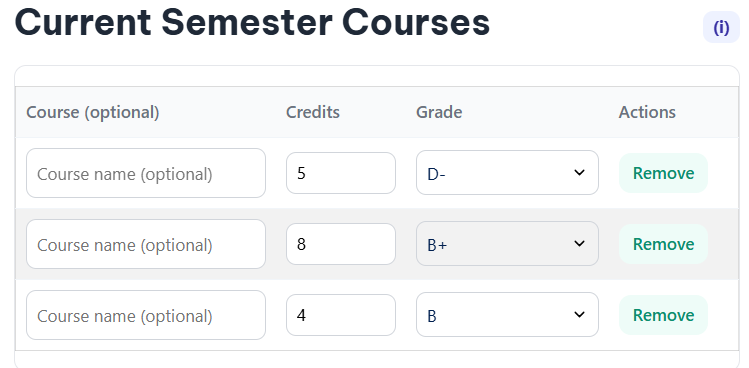
Current Semester Courses
| Course (optional) | Credits | Grade | Actions |
|---|
Results
Grade Conversions (Approx.)
Managing your academic performance at Universiti Teknologi Malaysia (UTM) just became simpler. Your Cumulative Grade Point Average (CGPA) represents more than just numbers; it reflects your academic journey and opens doors to scholarships, internships, and career opportunities.
Our free UTM CGPA Calculator 2025 eliminates the guesswork from academic planning. Whether you’re tracking semester progress, planning for graduation honors, or recovering from a challenging course, this tool provides accurate calculations based on UTM’s official grading system.
Understanding CGPA at UTM
What is CGPA?
CGPA (Cumulative Grade Point Average) measures your overall academic performance across all completed semesters at UTM. Unlike GPA, which calculates performance for a single semester, CGPA provides a comprehensive view of your entire academic journey.
UTM Grading System Breakdown
UTM uses a 4.0-scale grading system with 13 distinct grade levels. Understanding this system is crucial for accurate CGPA calculations:
| Grade | Marks Range | Grade Points |
| A+ | 90-100 | 4.00 |
| A | 80-89 | 4.00 |
| A- | 75-79 | 3.67 |
| B+ | 70-74 | 3.33 |
| B | 65-69 | 3.00 |
| B- | 60-64 | 2.67 |
| C+ | 55-59 | 2.33 |
| C | 50-54 | 2.00 |
| C- | 45-49 | 1.67 |
| D+ | 40-44 | 1.33 |
| D | 35-39 | 1.00 |
| D- | 30-34 | 0.67 |
| E | 0-29 | 0.00 |
GPA vs CGPA: Key Differences
GPA (Grade Point Average) calculates your performance for one semester only. CGPA (Cumulative Grade Point Average) combines all your semester results into one comprehensive score.
For example, if you earned a 3.2 GPA in your first semester and a 3.8 GPA in your second semester, your CGPA would be approximately 3.5 (assuming equal credit loads).
Introducing Our Free UTM CGPA Calculator 2025
Our calculator stands apart from existing tools by addressing common student needs that other calculators overlook. While competitors offer basic calculation features, our 2025 version provides enhanced functionality designed specifically for UTM students.
Key advantages include:
- No registration required – Start calculating immediately
- Mobile-optimized interface – Calculate anywhere, anytime
- Permanent result saving – Generate shareable links for future reference
- Up to 50 course entries – Handle even the heaviest semester loads
How to Use Our UTM CGPA Calculator 2025
Step 1: Enter Previous Academic Information
Start by inputting your current CGPA and total credits earned from previous semesters. This information appears on your official UTM transcript.
Example: If you’re entering your third semester with a CGPA of 3.4 and 42 completed credits, enter these values in the “Prior Cumulative GPA” section.
Step 2: Input Current Semester Courses
For each course you’re taking this semester:
- Enter the course credits (typically 1-4 credits per course)
- Select your expected or actual grade from the dropdown menu
- Optionally add course descriptions for better record-keeping
Step 3: Add Additional Courses
Use the “Add Course” button to include more subjects. The calculator accommodates up to 50 courses, making it suitable for students taking heavy course loads or planning multiple semesters ahead.
Step 4: Calculate and Review Results
Click “Calculate” to see your:
- Semester GPA – Performance for current semester only
- Updated CGPA – Your new cumulative average
- Total credits – Combined credits from all semesters
Step 5: Save Your Results
Generate a permanent link to your calculation or save results locally. This feature lets you track progress over time and share results with academic advisors.
Real-World Calculator Applications
Scenario 1: Planning for Target CGPA
Sarah wants to achieve a CGPA of 3.5 by graduation. Currently in her fifth semester with a 3.2 CGPA and 78 credits, she uses the calculator to determine what grades she needs in her remaining 42 credits. By inputting different grade combinations, she discovers she needs to maintain at least a 3.9 GPA across her final semesters.
Scenario 2: Assessing Impact of Poor Performance
John received a C- (1.67 points) in his 4-credit Calculus course, significantly lower than expected. Using the calculator, he inputs this grade alongside his other semester courses to see his CGPA drop from 3.6 to 3.4. This helps him understand the real impact and plan recovery strategies for subsequent semesters.
Tips for Improving Your CGPA
Consistent Performance Strategy
Rather than aiming for perfect grades in some courses while neglecting others, maintain steady performance across all subjects. A consistent 3.5 GPA across four courses contributes more than getting 4.0 in two courses and 2.5 in the other two.
Strategic Course Planning
- Balance difficult and manageable courses each semester
- Take prerequisite courses early to avoid scheduling conflicts
- Consider summer courses for GPA improvement opportunities
Utilize University Resources
UTM offers numerous academic support services:
- Tutoring centers for challenging subjects
- Study groups organized through student associations
- Office hours with professors and teaching assistants
- Academic counseling for personalized guidance
Monitor Progress Regularly
Check your CGPA after each semester rather than waiting until graduation approaches. Early identification of concerning trends allows time for corrective action.
Take Control of Your Academic Success
Understanding and tracking your CGPA empowers you to make informed decisions about your academic future at UTM. Whether you’re planning for scholarships, preparing for graduate school applications, or simply monitoring your progress toward graduation, accurate CGPA calculations form the foundation of effective academic planning.